Abstract
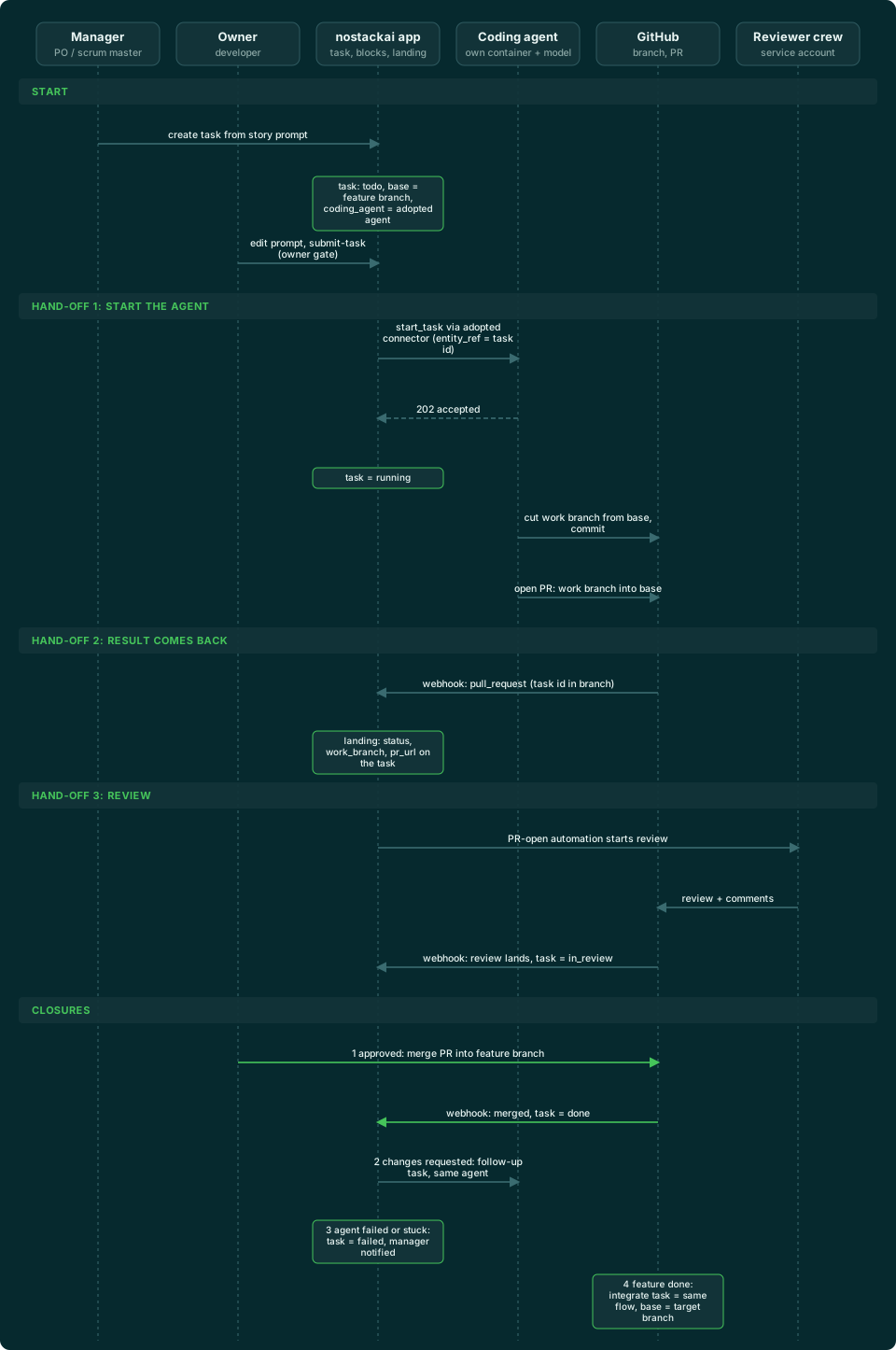
A software team's day is stories, tasks, code, reviews and merges. This case study builds that loop on nostackai around one idea: the coding is done by a coding agent you invoke, not by the platform. A manager turns a story into tasks, each task starts from a prompt its owner can edit, and only the owner can submit it. Submitting starts the coding agent your organization chose, here Claude Code running on Kimi, in its own container. The agent works on a branch of its own, opens a pull request, a reviewer agent comments on it, and the owner merges. The task records every step.
You will create three entities, five Logic Blocks, seven automations, four crews and three access policies, set up one coding-agent connector, and import almost all of it from a single file. A closing section shows how to plug in any other coding agent in five steps, because the board does not care which one runs.
Who this is for
Teams building a software workflow on nostackai: a developer wiring a board, an agency delivering one, or a lead deciding whether AI coding fits their process. You do not need to write code to follow along. You do need to be comfortable in a GitHub repository's settings.
What you need
- A nostackai organization with one tenant, and org-admin access to its console.
- A GitHub repository you administer, with Actions enabled and Actions minutes available. A private repository on an account with failed billing will not start jobs (see *What to expect*).
- A GitHub token for each person who will start work, and one for the review bot. A person's token must be allowed to run workflows; whoever prepares the repository needs admin rights on it.
- An AI provider key. The example uses Kimi through its Anthropic-protocol endpoint; any provider on the Anthropic protocol works with Claude Code.
- About 45 minutes.
The scenario and what it must do
A small team keeps its work as stories. Each story is split into tasks for a role: a developer task, a product-owner task that writes acceptance criteria, a scrum-master task that proposes a split. A human owns each task. For a developer task the work is code, so the owner hands it to a coding agent.
| Requirement | How it is met |
|---|---|
| Stories become tasks per role | The create-task Logic Block drafts a prompt from the role's template plus the story |
| A human owns each task and decides when it starts | submit-task refuses anyone but the owner, and an access policy denies direct writes to tasks, so the block cannot be bypassed |
| The coding is done by an agent in its own container, on its own branch | submit-task calls start_task on the coding-agent connector named on the task; the branch is named after the task |
| The pull request targets the feature branch, not always main | The task's base branch comes from its story's feature branch, and is main when the story has none |
| A review before the merge | A reviewer crew comments as a bot account; it never approves and never merges |
| The owner merges | merge-task merges with the owner's own GitHub token, so the repository's own rules still apply |
| The task shows what happened | GitHub's webhook writes the pull request onto the task, and sync-task reads the agent's run |
How it fits together
The board is plain nostackai: entities, Logic Blocks, automations and crews. The coding agent is a connector, like PayPal or Slack. A connector is a set of actions and the credentials they use, so the board starts any agent with the same two actions, start_task and get_task, and never needs to know how that agent works inside. The agent runs in a container that its own vendor or GitHub provides, on its own model, and nostackai only invokes it and waits for the result.
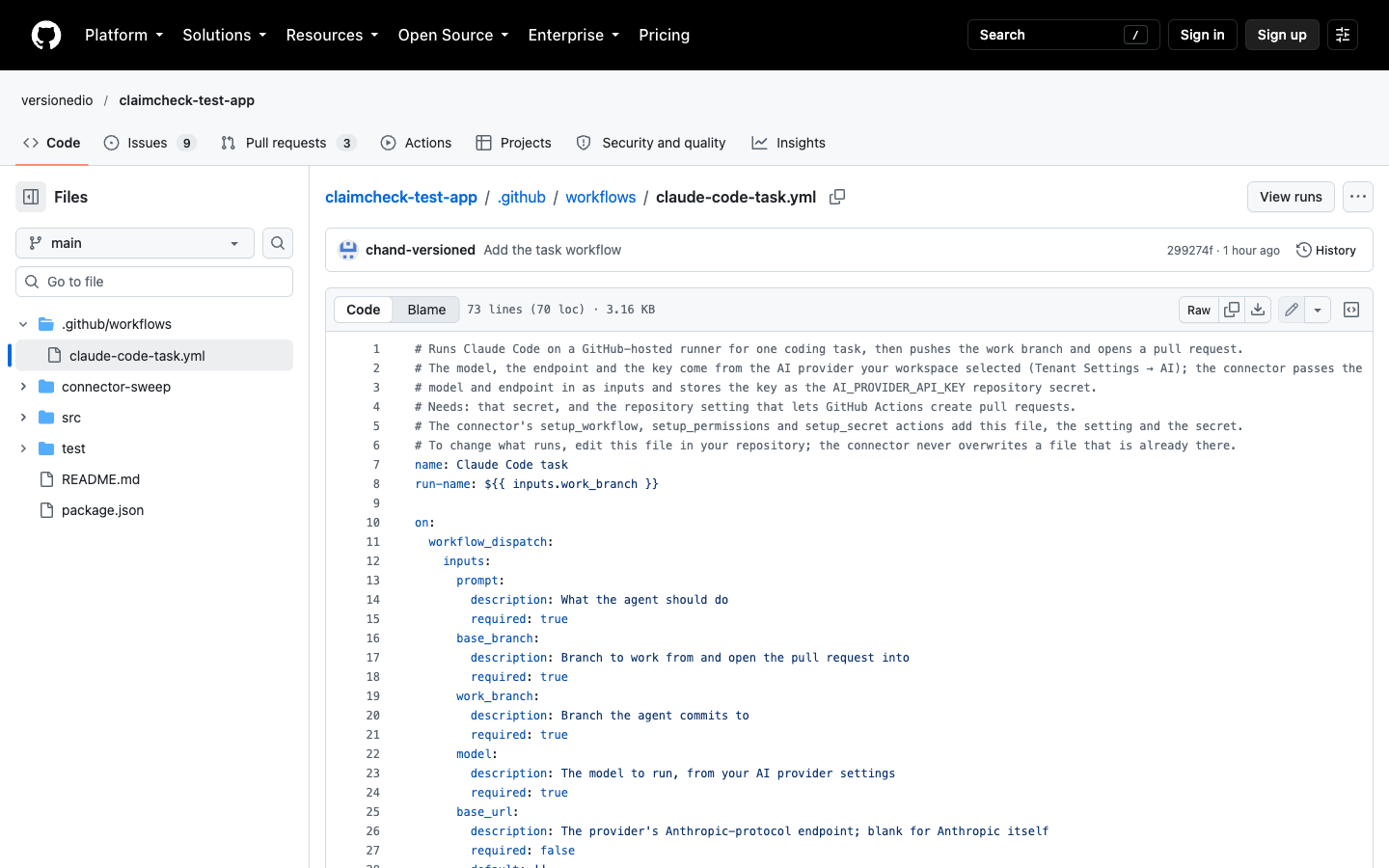
Claude Code has no hosted start-task API an organization can call with an API key, so its connector starts it the way GitHub supports: it triggers a workflow in your repository. The workflow runs Claude Code on a GitHub runner, commits to a branch named after the task, and opens the pull request. The model, its endpoint and its key come from the AI providers you set up in Tenant Settings, not from the connector.
The data model
Three entities hold the board. They are ordinary entities you define once; add a field the same way you would anywhere else.
| Entity | Fields |
|---|---|
| story | name, description, acceptance_criteria, stage, repo, feature_branch, target_branch |
| role_prompt | name (the role), label, template |
| task | name, story_id, role, owner_id, status, prompt, repo, category, priority, base_branch, work_branch, coding_agent, agent_task_id, agent_status, branch, pr_url, pr_number, pr_state, merged, review_state, reviewed, review_summary, result |
| Task field | Meaning |
|---|---|
| owner_id | The tenant user who owns the task. Use the user's id from the tenant's user list, not an id copied from a token |
| base_branch | Where the work starts and the pull request goes. The story's feature branch, else main |
| work_branch | The branch the agent is asked to commit to. It is the task's own id |
| coding_agent | The connector instance that does the coding, for example claude-code:kimi. Blank means the older crew that edits files through GitHub tools |
| agent_task_id, agent_status | The agent's handle for this run, and how it is going (the run's conclusion once it has one) |
| pr_url, pr_number, pr_state, merged | Written by GitHub's webhook as the pull request opens, is reviewed and is merged |
| reviewed, review_state, review_summary | Set by the reviewer crew so the board starts only one review |
Every asset the board uses
| Asset | What it does |
|---|---|
| create-task (Logic Block) | Creates a task for a story's role, fills base and work branch, and drafts the prompt |
| assign-task | The manager sets the owner, category and priority of a draft task |
| submit-task | The owner's gate. Saves an edited prompt, sets the task to submitted, and starts the chosen coding agent |
| sync-task | Reads the agent's run through get_task and records its state and, once there is one, the pull request |
| merge-task | The owner merges the task's pull request with their own GitHub token |
| Automations (7) | Start the product-owner, scrum-master and reviewer crews at the right moment; start the older developer crew only for a task with no coding agent; start the reviewer when an agent's pull request opens; mark the task done when its pull request is merged |
| Crews (4) | Developer (the older API-tool path), product owner, scrum master, reviewer |
| Connectors | github:claims (personal tokens), github:service (a shared token for the review bot), claude-code:kimi (the coding agent) |
| Access policies (3) | board-member (the owner role), board-manager, board-setup (lets one person run the repository setup) |
Part A: set up the connectors and the repository
1. Add an AI provider
In Org Settings, AI Providers, enable the provider, then in Tenant Settings, AI add its key and a default model. For Kimi, if *Kimi Code (Anthropic protocol)* is not in your catalog, add a custom provider: protocol Anthropic, base URL https://api.moonshot.ai/anthropic, and the models you want (the example default is kimi-k3.1-pro). Make it the workspace default if you like.
2. Adopt the connectors
In Org Settings, Connectors, enable GitHub twice, as github:claims and github:service, and Claude Code (GitHub runner) as claude-code:kimi. An instance name is yours to choose; use it everywhere below.
3. Configure the claude-code:kimi connection
In Tenant Settings, Connectors, set the GitHub owner and choose the Personal method, where each person uses their own GitHub token. Leave AI provider and Model blank to use your default, or pick them here to pin this connection. The workflow is shown read-only; the platform provides it.
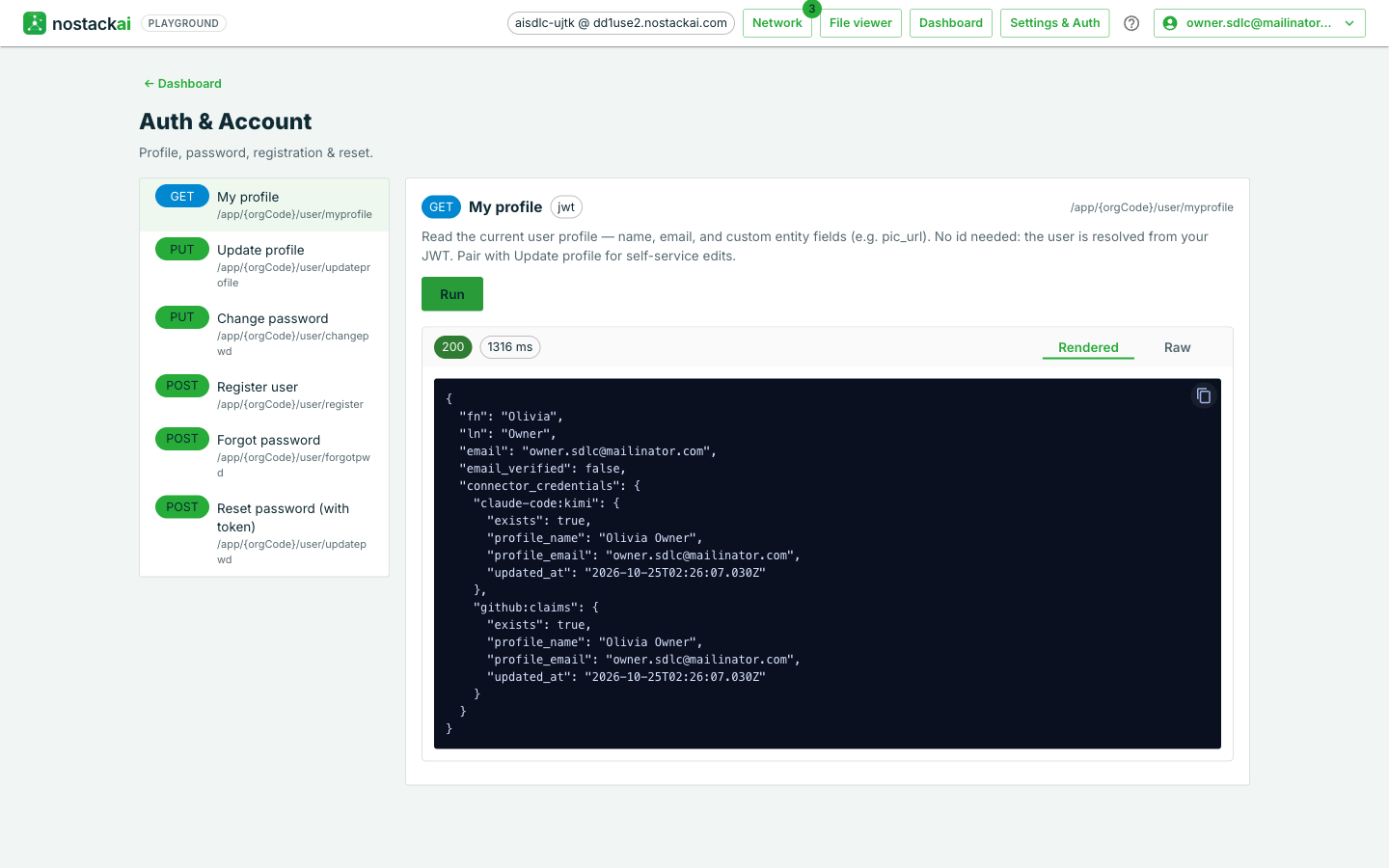
4. Let each person connect their GitHub token
Your application saves it on the person's own record, once per instance. The Playground's Update profile form does the same:
{
  "connector_credentials": {
    "github:claims":    { "token": "<their GitHub token>" },
    "claude-code:kimi": { "token": "<their GitHub token>" }
  }
}
5. Prepare the repository once
As a person with admin rights on the repository, run the three setup actions on the connector. Each skips what is already there, so a rerun is safe:
POST /app/{orgCode}/ipaas/claude-code:kimi   { "action_id": "setup_workflow",    "fields": { "repo": "my-repo", "branch": "main" } }
POST /app/{orgCode}/ipaas/claude-code:kimi   { "action_id": "setup_permissions", "fields": { "repo": "my-repo" } }
POST /app/{orgCode}/ipaas/claude-code:kimi { "action_id": "setup_secret", "fields": { "repo": "my-repo" } }- setup_workflow commits the platform's workflow to
.github/workflows/claude-code-task.yml. You can edit that file in your repository afterwards; the connector never overwrites it. - setup_permissions turns on *Allow GitHub Actions to create and approve pull requests* for the repository.
- setup_secret stores your AI provider's key as the repository secret
AI_PROVIDER_API_KEY, encrypted for GitHub. Run it again withreplaceset to true after you rotate the key.
The setup needs admin rights
If a setup action returns a 403 or 404 that mentions the token, the GitHub token needs admin rights on the repository (a classic token with the repo scope, or a fine-grained token with Administration, Contents, Secrets and Workflows). A 409 on setup_permissions means the organization that owns the repository has that setting turned off or locked; an organization owner must allow it under Organization settings, Actions, General, Workflow permissions. The person running setup also needs the board-setup policy.
6. Point the repository's webhook at the connector
In the repository's Settings, Webhooks, use the URL from the connector's webhook panel in Tenant Settings and the same secret you saved in the connector's Webhook Secret setting, choose JSON, and select *Pull requests* and *Pull request reviews*. Then set the connector's webhook landing, which tells it how a pull request updates a task (in the connector's webhook settings, or with the set_connector_webhook_landing MCP tool). The branch is the task's id, so the pull request's branch names the row:
{
  "pull_request": {
    "target_entity": "task", "operation": "update", "target_id": "{{pull_request.head.ref}}",
    "field_mapping": {
      "pr_url": "{{pull_request.html_url}}", "pr_number": "{{pull_request.number}}",
      "pr_state": "{{pull_request.state}}", "merged": "{{pull_request.merged}}"
    }
  },
  "pull_request_review": {
    "target_entity": "task", "operation": "update", "target_id": "{{pull_request.head.ref}}",
    "field_mapping": { "review_state": "{{review.state}}" }
  }
}
Part B: import the board
Everything except the connectors, the credentials and the access policies is in one file. Download sdlc-bundle.json and open Org Settings, Import Metadata. Run the dry run first and read its lines, then import. Import only creates, so it never overwrites something that already exists.
- The file names a demonstration repository,
claimcheck-test-app, and the connector instancesgithub:claimsandgithub:serviceinside the crews' tools. Replace those with your own before you import. - The crews arrive as drafts. In Agents, move each one from draft to staged to active.
- Create the access policies below, assign board-member to the people who own and merge tasks, board-manager to your manager, and board-setup to whoever prepares repositories.
- Add your role prompts (developer, product_owner, scrum_master, reviewer) and one story. The role prompt is the standing instruction for that role; the owner edits a copy of it on each task.
board-member   Allow  *  on /logicblocks/create-task, submit-task, merge-task, sync-task;
                      *  on /agents/sdlc-developer|product-owner|scrum-master/invoke, /jobs/*
               Deny   createtask, updatetask, deletetask on *            (tasks change only through the blocks)
board-manager  Allow  the same blocks plus /logicblocks/assign-task and the reviewer crew;
                      createstory, updatestory, createrole_prompt, updaterole_prompt
               Deny   createtask, updatetask, deletetask on *
board-setup    Allow  createclaude-code:kimi on /ipaas/claude-code:kimi
A new block needs its own policy line
The policies name each block by path. If you add a block later and a person gets a 403 saying no identity-based policy allows the call, add that block's path to their policy.
Part C: run a task
1. The manager creates the task
Call create-task for a story's role, naming the owner and the coding agent. The owner is the tenant user's id from the tenant's user list.
POST /app/{orgCode}/logicblocks/create-task
{ "story_id": "<story id>", "role": "developer", "owner_id": "<owner's user id>", "coding_agent": "claude-code:kimi" }
2. The task is a draft
It has its base branch, a work branch equal to its own id, and a prompt made from the role's template plus the story. Optionally the manager sets category and priority with assign-task.
3. The owner edits the prompt and submits
Only the owner can. The block saves the prompt, sets the task to submitted, starts the agent, and records the run's handle:
POST /app/{orgCode}/logicblocks/submit-task
{ "task_id": "<task id>", "prompt": "<the edited prompt, optional>" }
4. The agent works
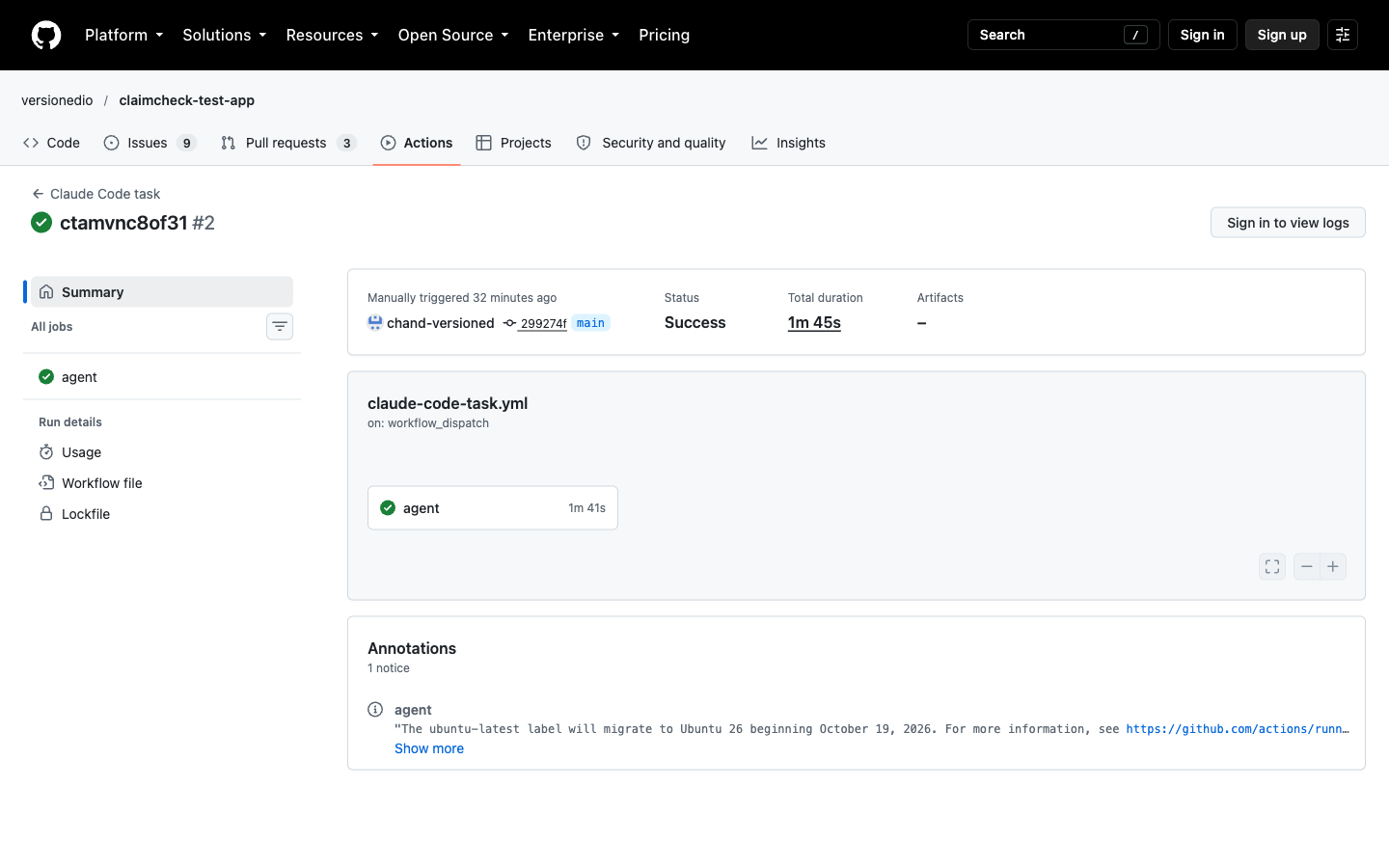
The task goes to running. In the repository's Actions tab a run titled with the task id starts a GitHub runner, runs Claude Code on your selected provider and model, commits to the branch named after the task, and opens a pull request into the base branch.
5. The result lands on the task
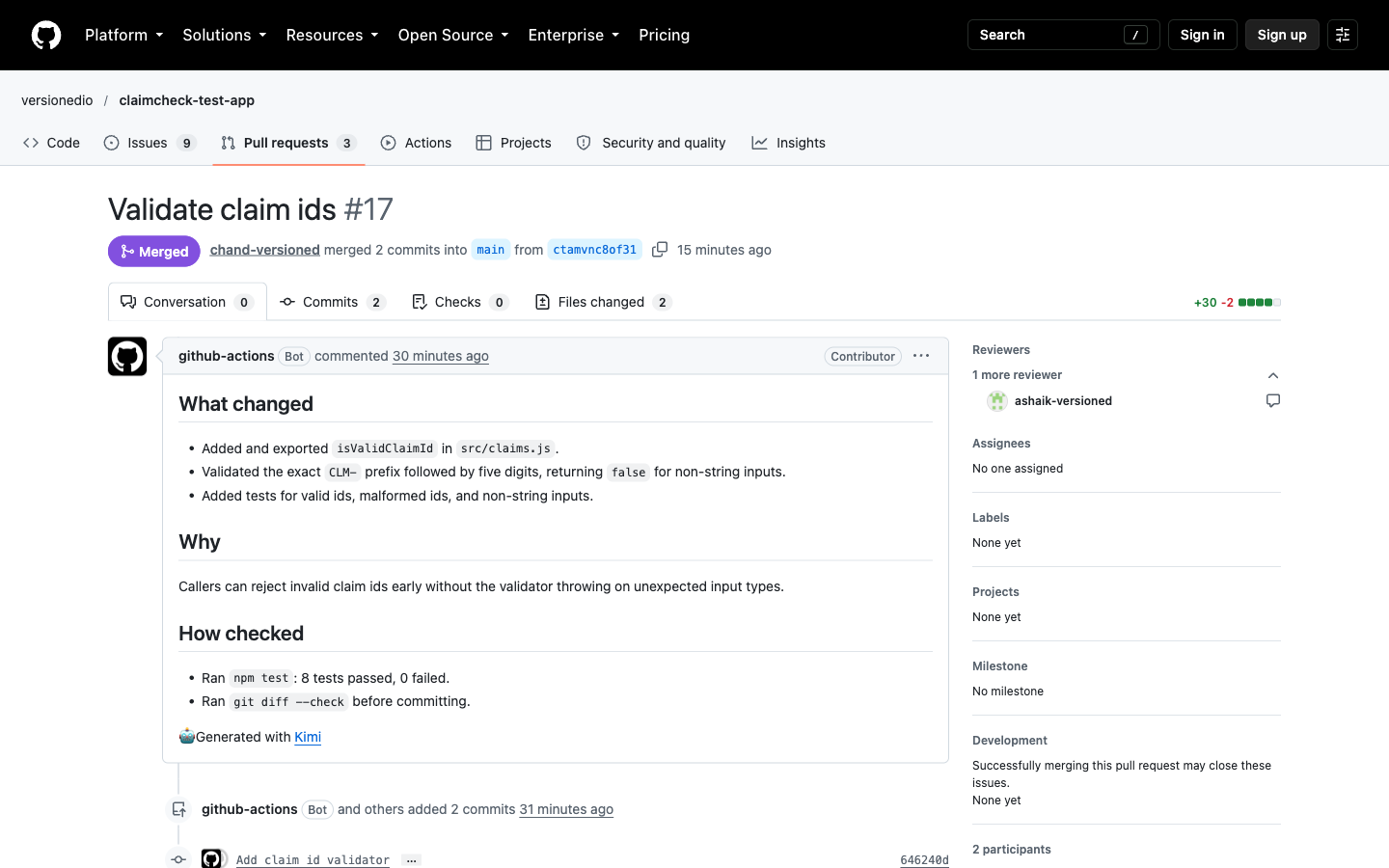
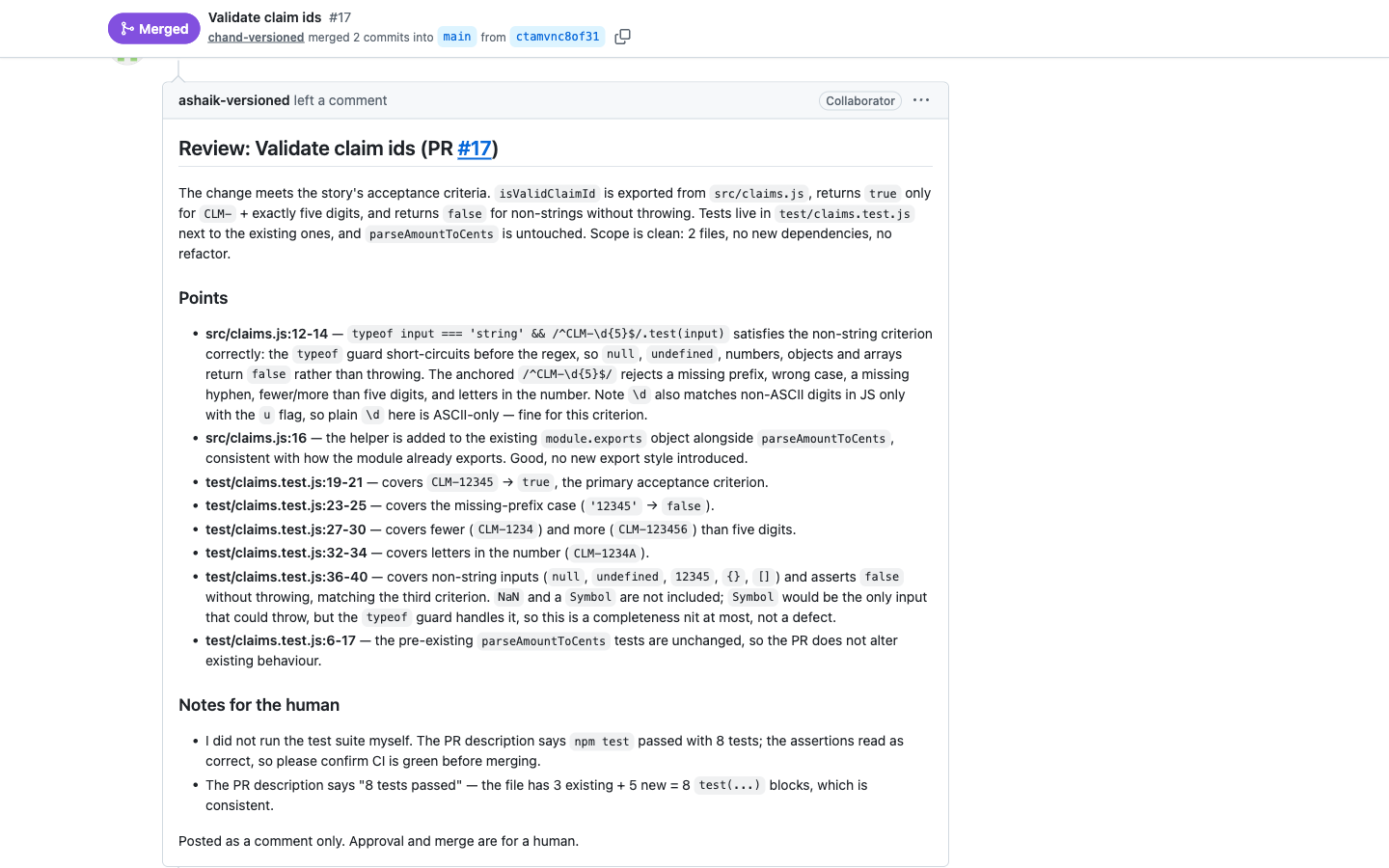
GitHub's webhook finds the task by its branch and records the pull request: its link, number and state. The reviewer crew starts by itself and leaves a comment as the review bot. It never approves and never merges.
6. The owner merges
merge-task merges with the owner's own GitHub token. The webhook reports the merge and the task becomes done.
7. Check the run any time
sync-task reads the agent's run through get_task and records how it ended (success or failure) on the task.
| Moment | Task status | What the task shows |
|---|---|---|
| Created | draft | prompt, base_branch, work_branch, coding_agent |
| Submitted | running | agent_task_id, agent_status started |
| Pull request opened | running | pr_url, pr_number, pr_state open; then reviewed, review_summary |
| Merged | done | pr_state closed, merged true; sync-task shows agent_status success |
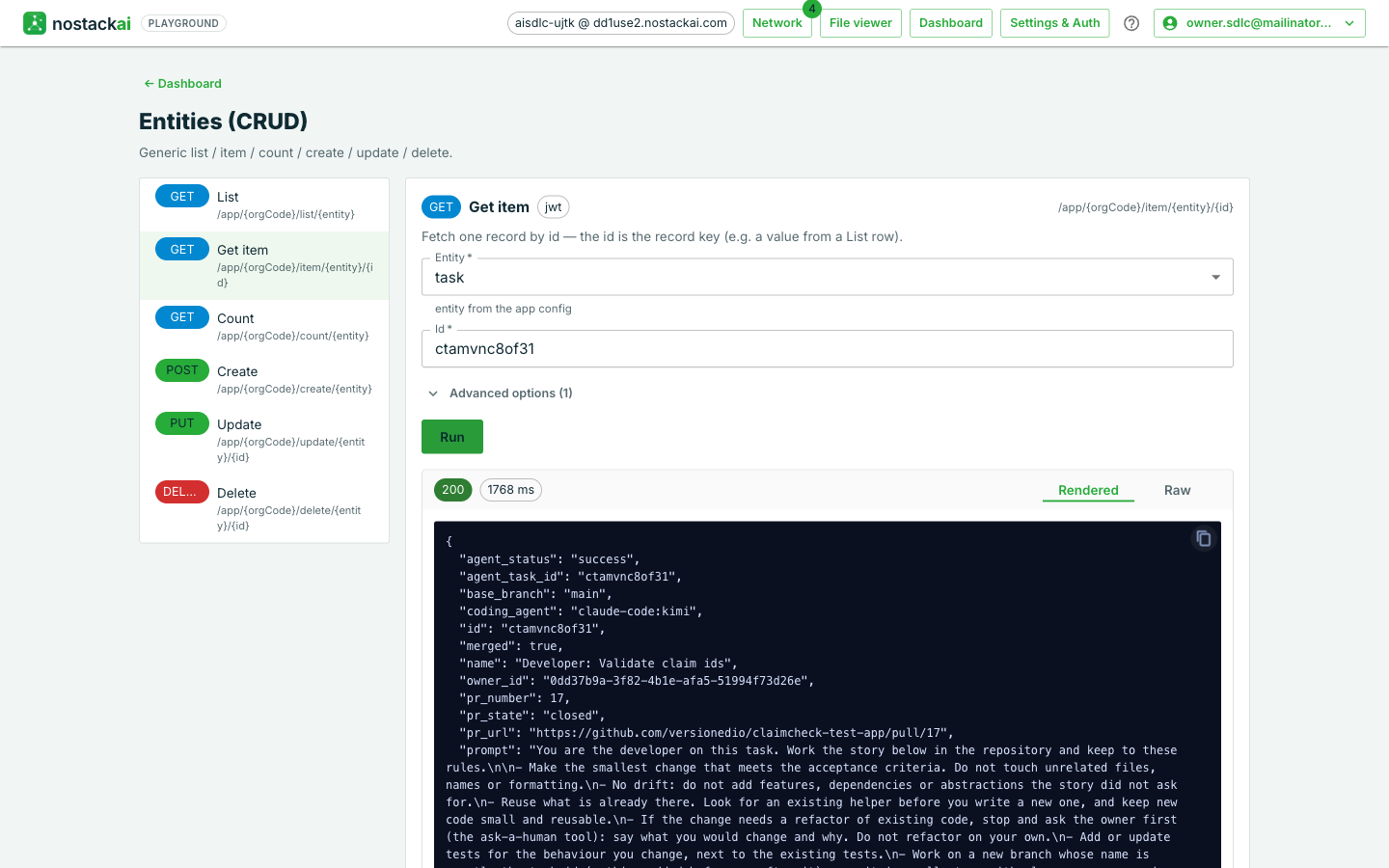
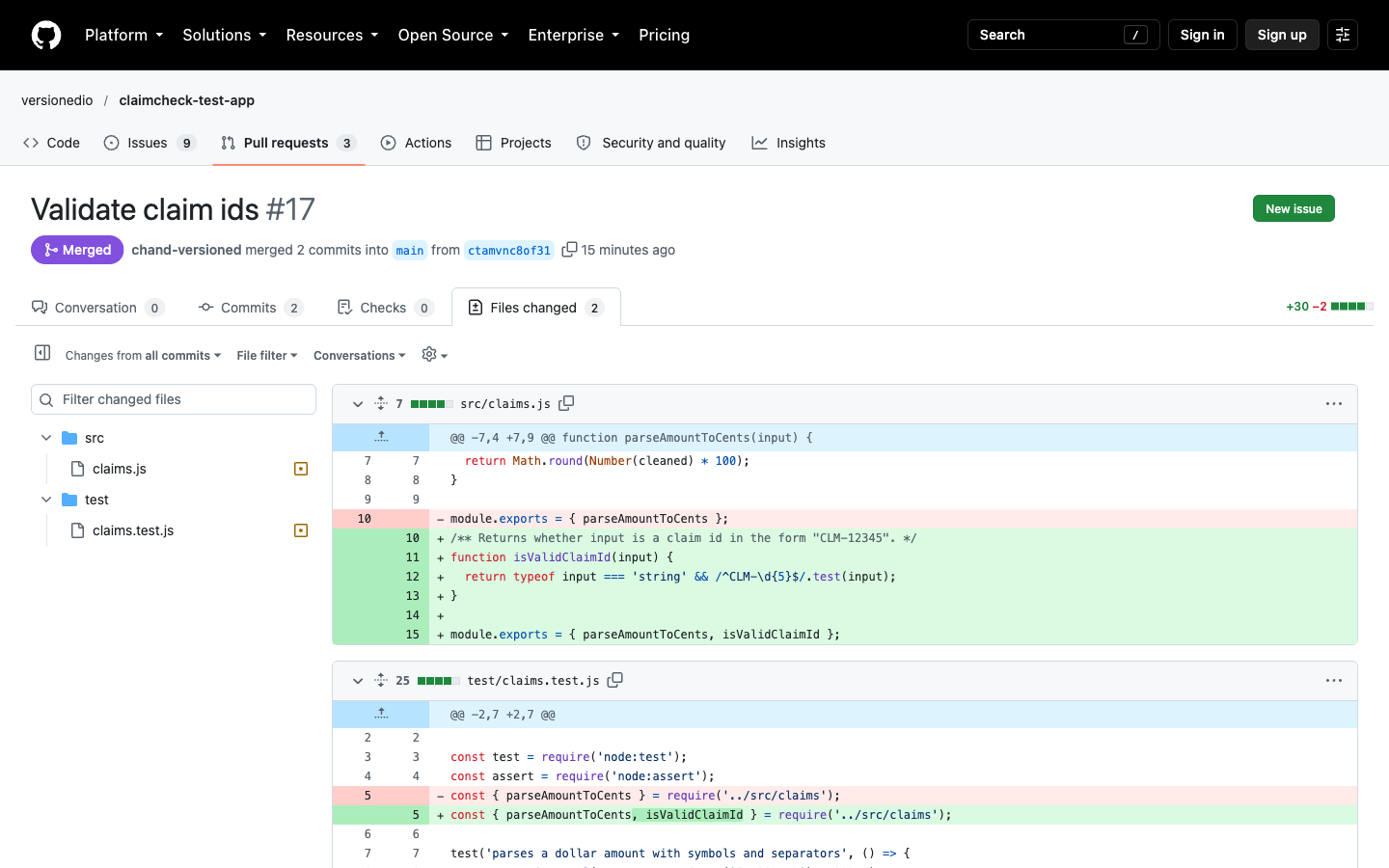
In the run behind this case study the agent changed two files, a source file and its test (30 lines added, 2 removed) in two commits, with a pull request description saying what changed, why and how it was checked. The run took about a minute and a half.
How the model is chosen
The connector declares only which kinds of provider it can run on; the model is yours. For Claude Code that is any provider on the Anthropic protocol. The choice follows one order: what a single call names, then what you saved on the connection, then your workspace's default provider and its default model. A model that was selected is never swapped for another. If no provider can serve the connector, the call fails and says to add one in Tenant Settings, AI. Your provider's key is stored in the repository as a secret because the workflow runs there. The setup action sends it to GitHub encrypted, and it is not written onto the task.
Plug in any coding agent
Nothing above is specific to Claude Code. The board starts whichever connector the task names, so adding a different agent, today or when a new one launches, never changes the board, its blocks, the webhook landing, the reviewer or the merge gate.
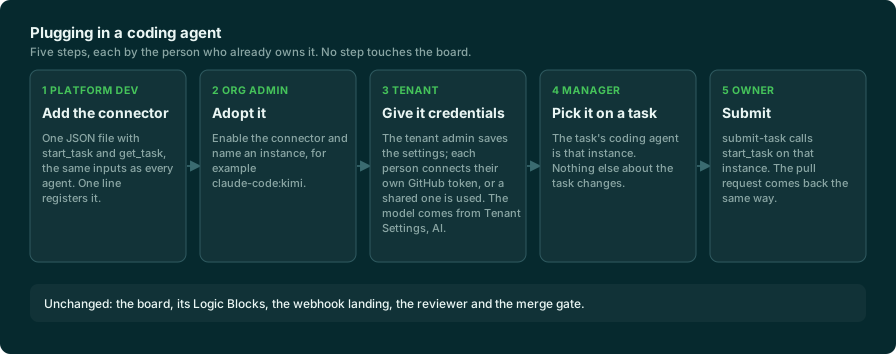
What an agent connector must provide is small and the same for every agent: two actions with the same inputs. Everything vendor-specific lives inside its steps.
{
  "connector_id": "my-agent",
  "category": "coding_agent",
  "actions": [
    { "action_id": "start_task",
      "input_schema": [ {"name":"repo"}, {"name":"base_branch"}, {"name":"work_branch"}, {"name":"prompt"} ],
      "steps": [ { "step_id": "task", "http_method": "POST", "url_template": "https://agent.example/v1/tasks",
                   "payload": { "repo": "{{input.repo}}", "from": "{{input.base_branch}}", "prompt": "{{input.prompt}}" },
                   "capture": { "task_id": "id" } } ],
      "returns": { "task_id": "{{steps.task.task_id}}" } },
    { "action_id": "get_task",
      "input_schema": [ {"name":"task_id"} ],
      "steps": [ { "step_id": "task", "http_method": "GET", "url_template": "https://agent.example/v1/tasks/{{input.task_id}}",
                   "capture": { "status": "state", "pr_url": "outputs[*].pullRequest.url" } } ],
      "returns": { "status": "{{steps.task.status}}", "pr_url": "{{steps.task.pr_url}}" } }
  ]
}- Platform developer: add that one file and register it. A step can send fixed headers, skip itself when something already exists, tolerate an expected status such as 404, and explain a failure in plain words; a payload can encrypt a value for GitHub. A connector that runs a model declares which provider protocols it can use, and takes the model, endpoint and key from the tenant's providers.
- Org admin: adopt the connector and name an instance.
- Tenant: set the connector's credentials and, if it runs a model, the provider and model.
- Manager or owner: put the instance name on the task's coding agent.
- Result path: if the agent works on a branch named after the task, the webhook lands it with no extra work. If the agent picks its own branch name, sync-task attaches its pull request from get_task.
| Claude Code (GitHub runner) | Codex (GitHub runner) | Claude Managed Agents | Jules | GitHub Copilot | |
|---|---|---|---|---|---|
| Started by | A workflow in your repository | A workflow in your repository | Anthropic's sessions API (beta) | Jules sessions API (alpha) | GitHub's agent task API |
| Runs in | A GitHub-hosted runner | A GitHub-hosted runner | Anthropic's sandbox | Google's VM | GitHub's cloud agent |
| Credentials | Person's GitHub token; provider key as a repo secret | Person's GitHub token; OpenAI key as a repo secret | Anthropic provider key; person's GitHub token per session | Its own Jules API key | Person's GitHub token with a Copilot licence |
| One-time setup | setup_workflow, setup_permissions, setup_secret | The same three | An agent and an environment created once | The Jules GitHub app on the repository | None |
| Model comes from | Your Anthropic-protocol provider | Codex's own default, or one you pass | Your Anthropic provider | GitHub, or one you pass | |
| Branch | Named after the task | Named after the task | Asked for in the prompt | Chosen by Jules | Chosen by Copilot |
| Result back | Webhook, plus get_task on the run | Webhook, plus get_task on the run | get_task status, webhook for the pull request | get_task, with the pull request in its outputs | get_task, then the pull request is looked up by branch |
What has been run
Claude Code on Kimi was run end to end for this case study. Jules's calls were checked against its API with a real key. The Copilot, Codex and Managed Agents connectors follow the same two actions and are built from their vendors' documentation; run one against your own account before relying on it.
What to expect
| What you see | What it means |
|---|---|
| The run fails after a few seconds and the job never starts | GitHub did not start it. In the run's annotations: recent payments failed or the spending limit needs raising. Fix billing, or use a public repository |
| setup_permissions returns 409 | The organization turns off or locks *Allow GitHub Actions to create and approve pull requests*. An organization owner must allow it, then run setup again |
| A setup action returns 403 or 404 about the token | The token needs admin rights on the repository. Use a token that has them, or do that step in the repository settings yourself |
| submit-task says only the owner can submit | owner_id must be the tenant user's id, not an id from a token. Reassign the draft with assign-task |
| A call returns 403 saying no identity-based policy allows it | The caller's access policy does not list that block or route. Add its path |
| The call says no AI provider can be used | The connector needs a provider on its protocol with a key and a default model in Tenant Settings, AI |
| The task never shows the pull request | Check the webhook delivery in the repository and that the branch is the task's id. For an agent that picks its own branch, run sync-task |
Going to production
- Two token methods. Keep the personal instance for work people start, so GitHub shows who started each run. Add a second instance on the shared method, with a dedicated service account, for schedules and other background starts.
- Protect the branch. Require a review and status checks on the branch that tasks target. merge-task uses the owner's token, so GitHub's rules still apply to it.
- Bound what runs. The workflow lives in your repository. Edit it to cap turns or time, add checks or change the runner; the connector will not overwrite your copy.
- Rotate keys. After rotating a provider key, run setup_secret again with replace set to true.
- What is not covered here: attaching a pull request from an agent that chooses its own branch name needs a scheduled sync-task, mapping every vendor's failed state to a failed task, and anything that happens after the merge, such as releases.
Results and what to adapt
You have a board where a manager plans, an owner decides, a coding agent codes in its own container, a reviewer comments and the owner merges, with every step on the task. To adapt it, change a role's prompt, add a role, point a story at a feature branch, switch the task to another coding agent, or add an agent of your own with one connector file.