A connector is a ready-made integration with a third-party system — Slack, Salesforce, Stripe, a generic webhook. Each connector defines its own credential fields and a set of actions (e.g. "Post Message", "Create Contact", "Create Checkout"), and each action declares the fields it needs. You never write request code for a connector — you adopt it, supply credentials, and map fields.
Two roles, two steps
- Org admin or developer (OA) — Org Settings → Integrations → adopts a connector (some connectors support multiple named instances, e.g. two Salesforce accounts). For any connector where field mapping matters, the org admin or developer can also set up entity/field mapping here: which entity an action's data comes from, and which of the action's fields map to which entity field.
- Tenant admin (TA), or an org admin or developer acting for a tenant — Tenant Settings → Connectors → enters this workspace's own credentials (an API key, a bot token, etc. — whatever the connector's auth type calls for). Credentials are always per-tenant, never shared across workspaces, and never returned by any API once saved.
No credentials, no calls
A connector with no credentials saved for a tenant is simply skipped at runtime — not an error, unless a specific call is explicitly marked required.
Entity and field mapping
Every connector action declares a fixed list of fields it needs (its input schema) — some required, some optional, each with a type. Configuring an action means deciding, for every one of those fields, where its value comes from:
- A literal value — always the same, e.g. a fixed Slack channel.
- A field on an entity record — e.g. an entity's
emailcolumn, resolved when a specific record triggers the call. - A field on a related entity — reached from the main entity via a lookup.
- Supplied by whoever calls it — deferred to the caller (a client app, an automation author, a logic block author) instead of fixed in advance.
Once you map even one field for an action, every field that action declares must be accounted for — mapped to something, or explicitly marked "the caller supplies this." A few fields are never something you map at all: an identity-sourced field is stamped automatically from whoever's authenticated (so it can't be spoofed), and a tenant-sourced field is filled from the tenant's own saved settings.
Places to call a connector from
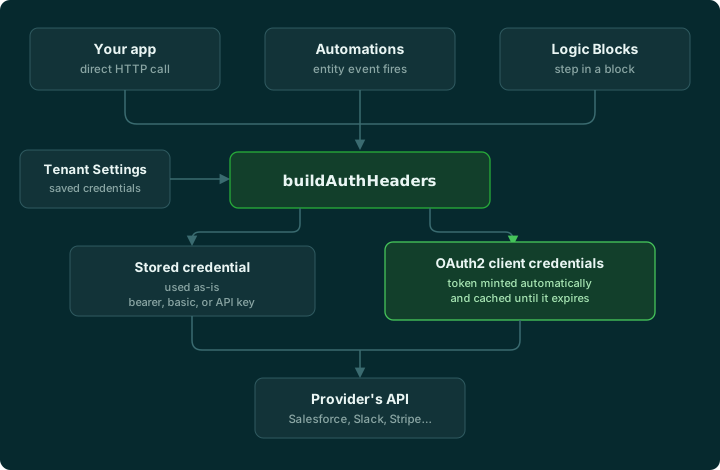
- Directly from your app — your client code calls the connector action over HTTP, supplying whichever fields were left for the caller.
- From an automation — attach a connector action as the destination of an entity lifecycle event (a record was created or updated); field values are pulled from the record that fired the event.
- From a logic block — add a connector step to a multi-step logic block; field values can come from earlier steps in the same block, or from the logic block's own inputs.
Three more surfaces make the same call: a schedule that targets a connector action, an agent tool, and a Glyph (ctx.connector). They are set up in their own sections.
Every one of them goes through the same shared call and reads the exact same connector definition and the exact same saved credentials — only where the field values come from differs. See Using a connector for the details of the first three.
Available connectors
- Email — send a transactional email.
- Slack — post a message to a channel.
- Twilio — send an SMS.
- Salesforce — create, update, or upsert a record.
- Calendly — read bookable event types, scheduled events, and who booked them; optionally land new bookings and cancellations as entity records via an inbound webhook.
- S3 — write, read, or generate an upload link for an object in the tenant's own bucket.
- Webhook — POST or PUT to any HTTPS URL you specify, with a freeform body.
- Zapier — trigger a Zap via its catch-hook URL, with a freeform body.
- Stripe — start a checkout (one-time, subscription, or multi-item cart), cancel a subscription.
- Paddle — start a checkout (single item or multi-item cart), cancel a subscription.
- Dodo Payments — start a checkout (subscription, one-time, or multi-item cart), cancel a subscription.
- PayPal — start a subscription or one-time checkout, cancel a subscription.
- GitHub — branches, commits, pull requests, reviews, checks, workflows, merges, and linked issues, with an inbound webhook that keeps a landed record in step with the repo.
- Tavily — run an AI-optimized web search and get back ranked, summarized results.
- Serper — run a Google search and get back structured results.
- Screenshot Service — capture a screenshot of any URL and get back an image.
- Google Maps — suggest addresses as someone types, validate an address, and look up a place.
- EasyPost — get live shipping rates and buy a label.
- TaxJar — work out the sales tax to collect on an order.
- Amazon Web Services — create, update, inspect and delete CloudFormation stacks, and look up ACM certificates, Route 53 hosted zones and IAM OpenID Connect providers, in the tenant's own AWS account with its own access keys.
- Coding agents — Claude Code, Claude (Managed Agents), OpenAI Codex, GitHub Copilot, Google Jules and Muse Code: start a task on a repository and poll its progress; the agent works on its own branch and opens a pull request.
Stripe, Paddle, Dodo Payments, and PayPal are payment connectors — see Payment connectors for what's different about them (a Product Catalog, checkout, carts).
Setting up a connector
Adopting a connector, mapping fields, and entering credentials.
Getting credentials from each provider
Where to go on each connector's own website to generate its credentials.
Using a connector
Calling a connector directly, from an automation, or from a logic block.
Payment connectors
Stripe, Paddle, Dodo Payments, and PayPal — Product Catalog, checkout, and carts.